---
title: Client Membership History
description: In this article, learn how to view your historical membership enrollments.
---
[Skip to content](https://help.upperhand.com/client-profile-membership-history#main-content)
English
Show submenu for translations
[Submit a ticket](https://help.upperhand.com/kb-tickets/new?hsLang=en)

Open main navigation
Close main navigation
- English
Show submenu for translations
- [Submit a ticket](https://help.upperhand.com/kb-tickets/new)
- [Go to upperhand.com](https://upperhand.com/)
[Go to upperhand.com](https://upperhand.com/)
Hello. How can we help you?
- There are no suggestions because the search field is empty.
1. [UP Help Center](https://help.upperhand.com/?hsLang=en)
2. [Client Side](https://help.upperhand.com/client-side?hsLang=en)
3. [Memberships & Passes](https://help.upperhand.com/client-side?hsLang=en#memberships-passes)
# Client Membership History
## In this article, learn how to view your membership enrollment history from the client profile.
APPLIES TO: Admins, Clients
Last updated: June 24, 2026
**Note**: Admins can go to Contacts, view a client's profile, and follow these same steps to review a client's membership history.
#### **View Membership History from the Client Profile**
- [**Log in**](https://help.upperhand.com/why-can-t-i-log-in-to-upper-hand?hsLang=en) to your account and **navigate to the My Profile tab**
- If you are currently enrolled in a membership, you will see your membership card present under your profile icon and name. To see past enrollments **go to the Membership History tab**
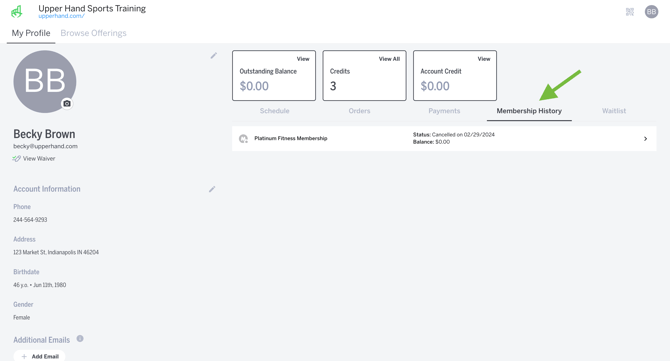
- **Here you can view the memberships you were previously enrolled in**. Each entry under the Membership Tab will include the:
- Membership Name
- Membership tier (if applicable)
- Membership cancellation date
- Any outstanding balance associated with each specific membership
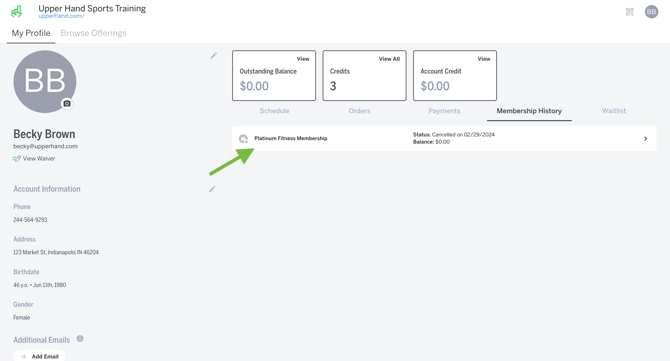
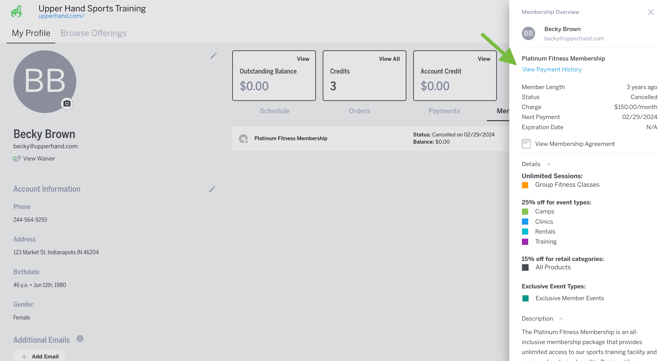
- **Click the membership name to open the Membership Overview**. This will give you all of the details of the membership and provides a link to **View Payment History**
****
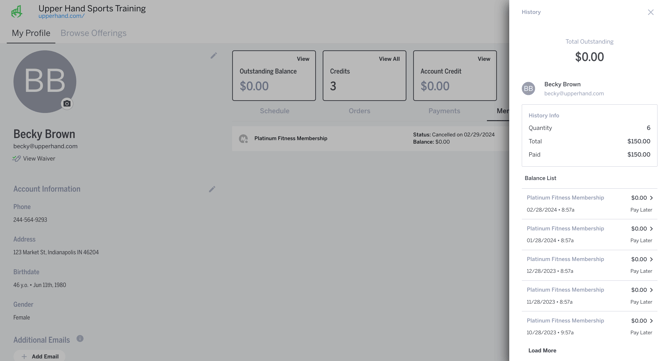
- **From the Payment History drawer** you will see all recurring payments related to the membership listed. You are able to click into each one to see the date, time, and amount of each payment.
- [Getting Started](https://help.upperhand.com/getting-started?hsLang=en)
- [Account Setup](https://help.upperhand.com/account-setup?hsLang=en#main-content)
- [Account Settings](https://help.upperhand.com/account-setup?hsLang=en#account-settings)
- [Help & Resources](https://help.upperhand.com/account-setup?hsLang=en#help-resources)
- [Billing](https://help.upperhand.com/account-setup?hsLang=en#billing)
- [Events](https://help.upperhand.com/events?hsLang=en#main-content)
- [Event Setup](https://help.upperhand.com/events?hsLang=en#event-setup)
- [Browse Events](https://help.upperhand.com/events?hsLang=en#browse-events)
- [Event Admin View](https://help.upperhand.com/events?hsLang=en#event-admin-view)
- [Classes](https://help.upperhand.com/classes?hsLang=en)
- [Teams](https://help.upperhand.com/teams?hsLang=en)
- [Calendar](https://help.upperhand.com/calendar?hsLang=en)
- [Contacts](https://help.upperhand.com/contacts?hsLang=en#main-content)
- [Staff](https://help.upperhand.com/contacts?hsLang=en#staff)
- [Clients](https://help.upperhand.com/contacts?hsLang=en#clients)
- [Groups](https://help.upperhand.com/contacts?hsLang=en#groups)
- [Archived](https://help.upperhand.com/contacts?hsLang=en#archived)
- [Marketing](https://help.upperhand.com/marketing?hsLang=en)
- [Reports](https://help.upperhand.com/reports?hsLang=en)
- [Memberships](https://help.upperhand.com/memberships?hsLang=en)
- [Credit Passes](https://help.upperhand.com/credit-passes?hsLang=en)
- [Resources](https://help.upperhand.com/resources?hsLang=en)
- [Retail](https://help.upperhand.com/retail?hsLang=en)
- [Settings](https://help.upperhand.com/settings?hsLang=en)
- [Point of Sale (POS)](https://help.upperhand.com/point-of-sale-pos?hsLang=en)
- [Payments](https://help.upperhand.com/payments?hsLang=en#main-content)
- [Paysafe/NETBANX](https://help.upperhand.com/payments?hsLang=en#paysafe-netbanx)
- [Client Side](https://help.upperhand.com/client-side?hsLang=en#main-content)
- [Top Searched Articles](https://help.upperhand.com/client-side?hsLang=en#top-searched-articles)
- [Account Management](https://help.upperhand.com/client-side?hsLang=en#account-management)
- [Event Sign Up](https://help.upperhand.com/client-side?hsLang=en#event-sign-up)
- [Scheduling](https://help.upperhand.com/client-side?hsLang=en#scheduling)
- [Payments](https://help.upperhand.com/client-side?hsLang=en#payments)
- [Memberships & Passes](https://help.upperhand.com/client-side?hsLang=en#memberships-passes)
- [Additional Resources](https://help.upperhand.com/additional-resources?hsLang=en#main-content)
- [Hardware](https://help.upperhand.com/additional-resources?hsLang=en#hardware)
- [Upper Hand AI](https://help.upperhand.com/additional-resources?hsLang=en#upper-hand-ai)
- [WebKit by Upper Hand](https://help.upperhand.com/additional-resources?hsLang=en#webkit-by-upper-hand)
- [Admin Side](https://help.upperhand.com/admin-side?hsLang=en#main-content)
- [Scheduling](https://help.upperhand.com/admin-side?hsLang=en#scheduling)
[](https://upperhand.com)
Email Hours: M-F 9am - 2am EST
Chat Hours: M-F 9am - 5pm EST
Copyright © 2026, Upper Hand