
Applies To: Clients
Last Updated: March 11, 2026
This feature enables households to assign a secondary account manager who can manage bookings for all managed profiles without accessing billing details of the account manager (main account holder). Allowing an additional adult to keep track of athlete schedules without sacrificing shared log-ins and access to payment information simplifies the experience for the entire family.
Note: To access this feature via mobile app you will need to update your Upper Hand app by force closing it and logging back in or checking the app store on your device for an update.
How to Assign a Secondary Manager
- Log in to your Upper Hand Account
- Click on your Profile Icon in the top right hand corner of the software
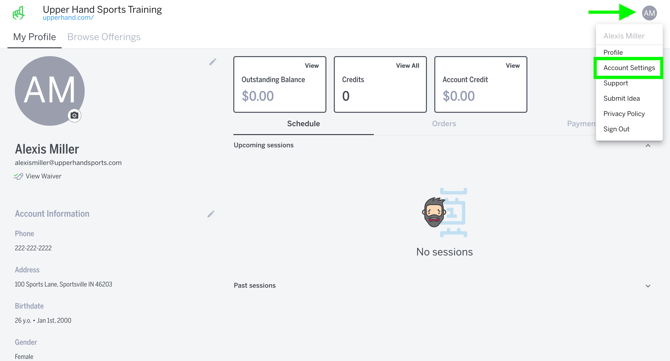
- Click Account Settings
- Go to the Manage Family tab in your settings
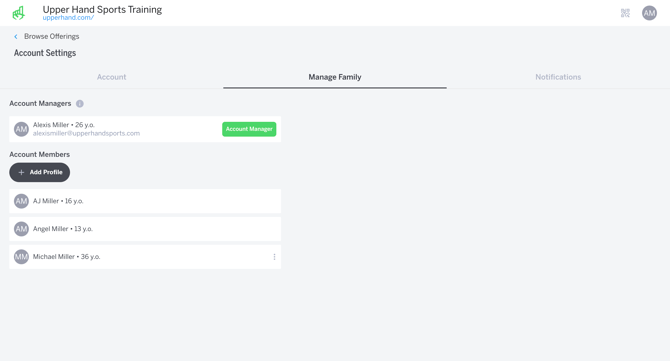
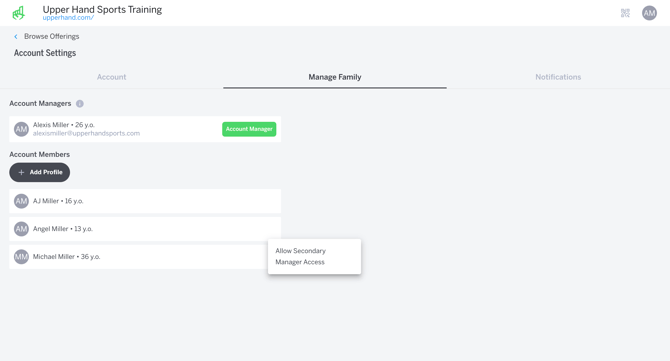
- Use the 3 dots on your chosen account member and click Allow Secondary Manager Access
- Note: If the profile is not above the age of 18 you cannot make them a secondary manager
- Add an email address for the profile you selected (*If they already have an email associated with their profile the software will recognize it) and Click Update Profile to confirm your secondary manager
.png?width=670&height=362&name=Assign%20Secondary%20Manager%20Modal%20(email%20required).png)
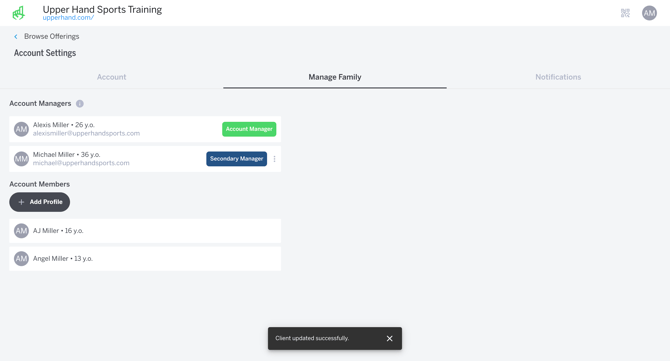
- Once confirmed, you'll see the profile for your secondary manager under your list of Account Managers with a Secondary Manager badge
Secondary Manager Permissions
As a secondary manager I can:
-
Book for myself and managed profiles
-
Save my own card on file
-
Receive all booking emails for all managed profiles
- View profile QR code for self and managed profiles
I cannot:
-
See the primary account holder's information (Including stored card, orders, payments etc.)
-
See the Manage Family tab in account settings
-
Receive payment confirmations from the primary account holder
-
Add new managed profiles
Things to Note:
- Only the account manager can assign or remove secondary manager access. Once a secondary manager is assigned they will no longer show under the account manager's managed profiles, however, they will still be visible as a secondary manager in the Manage Family settings.
- Only one secondary manager can be assigned.
- Managed profiles must be 18 years or older in order to be assigned as secondary manager.
- Secondary manager cannot view account manager's profile or any of their information.