![White Full @2x.png]](https://help.upperhand.com/hs-fs/hubfs/Brand%20Assets/White%20Full%20@2x.png?height=40&name=White%20Full%20@2x.png)
APPLIES TO: All Users
Last updated: June 22, 2023
Similar to your Events, each Membership comes with a unique URL that serves as the landing page for the membership for easy promotion. Below we will outline how to locate the unique URL to share and outline the components included in the Membership landing page. This article also includes how to find your Membership Page URL that shows all active memberships.
Unique Membership URL
- Log into your Upper Hand account and hover over the main navigation bar on the left hand side, click Memberships
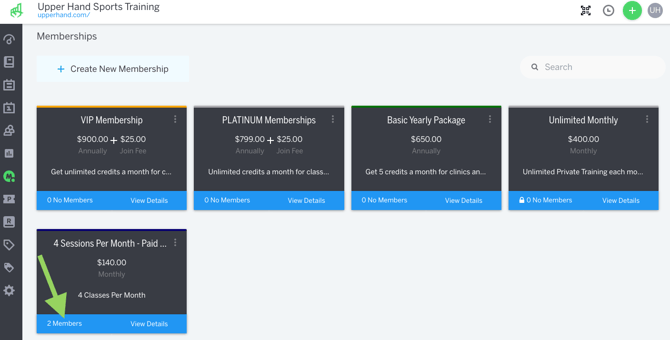
- Click where it says "X Members" on the membership you would like to share
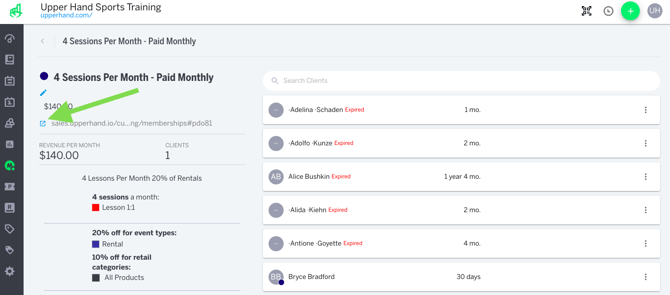
- You will see the Unique Membership URL on this page, listed underneath the price of the membership. You are able to copy that URL and post it to your website, social media posts or in an email to send people directly to that specific membership landing page.
Membership Landing Page
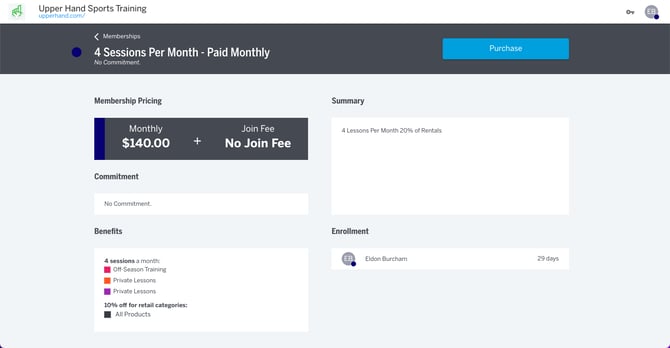
On this page you will see the following information:
- Top Bar - Includes the Membership Name at the top with the badge color, commitment length details and a blue purchase button to enroll
- Membership Pricing - Includes the Cost, Billing Cycle & Join Fee, if applicable
- Commitment - Includes the Commitment Length of the membership, if applicable
- Benefits - Includes all the discounts, session credits, and exclusive event types included with the membership
- Summary - A description about the membership
- Enrollment - When signed in as a client, this box will show which profiles are enrolled in the membership and how long they've been enrolled
Membership Page URL
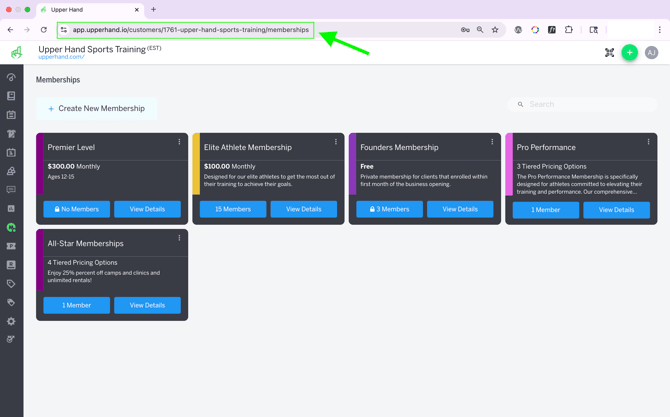
When viewing your list of memberships from the Memberships tab you can copy the full URL at the top of your browser. This URL will be what you post on your website, add to your social media posts, or email to clients that will list all of your active and invite-only memberships available to purchase.